

Billing
Billing
How NoviaHub charges: pricing methods, how per-token cost is calculated, group ratios, pre-charging and settlement, and how to check every charge.
In one sentence
Section titled “In one sentence”NoviaHub charges for actual usage: you pay for what you use. Charges come out of your account balance, which you can view and top up in Wallet. What every call cost is recorded in Usage logs.
- Currency: balances, prices and charges in the interface are shown in US dollars (
$). - Prices: every model’s price is public on the Models & Pricing page. The prices there already include the group ratio; the page says “Prices include each group’s ratio.”
Pricing methods
Section titled “Pricing methods”As of 2026-09-29, every model on NoviaHub uses Dynamic Pricing: the model list and model details on Models & Pricing show a Dynamic Pricing label, the Billing Mode in the details of Usage logs also says Dynamic Pricing, and Matched Tier shows which price tier the call used (for example standard).
“Dynamic Pricing” means the price is calculated from a pricing rule. It doesn’t mean the price keeps changing. For most models the rule is simply a fixed price per token. Depending on the rule, these kinds are in use today:
| Pricing method | How it charges | Examples online on 2026-09-29 |
|---|---|---|
| Per token | Input, output, cache reads and cache writes each have a price per million (1M) tokens | Claude models, kimi-k3, glm-5.3-flash, most Gemini models, gpt-image-2 |
| Tiered by input length | When the total input exceeds a threshold, the whole request is charged at a higher tier’s prices; the price table in the model’s details is marked Tiered pricing | GPT models (up to 272,000 tokens is the standard tier, above that the long_context tier); gemini-3.1-pro-low and gemini-pro-agent (threshold 200,000 tokens) |
| By time of day | Prices differ by time of day; the model card is marked Current period price | DeepSeek models: Monday to Friday 01:00–04:00 and 06:00–10:00 UTC are the peak tier, all other times the off_peak tier |
| Per image | A fixed price for each generated image, in resolution tiers | gemini-3.1-flash-image; see Image generation |
Pricing rules and prices can change; the model’s details page is authoritative.
What is a token? The smallest unit a model processes text in, roughly “a short piece of a word”. How many tokens a piece of text becomes varies by model; there is no fixed conversion. The exact count for each call is the usage the model reports, which you can see in the usage logs.
How per-token cost is calculated
Section titled “How per-token cost is calculated”The cost of one call = (the sum of the items below) × group ratio:
- input tokens that missed the cache × input price
- cache-read tokens × cache read price
- cache-write tokens × cache write price
- output tokens × output price
If a model prices image or audio input separately (columns such as Image In in the price table), that part is charged at its own price and no longer counted as normal input. For what caching means, see Prompt caching.
A worked example
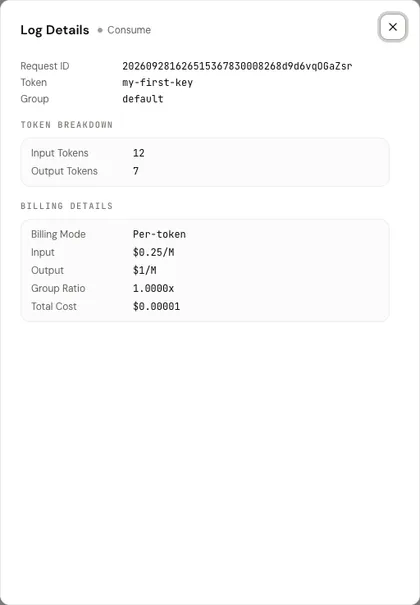
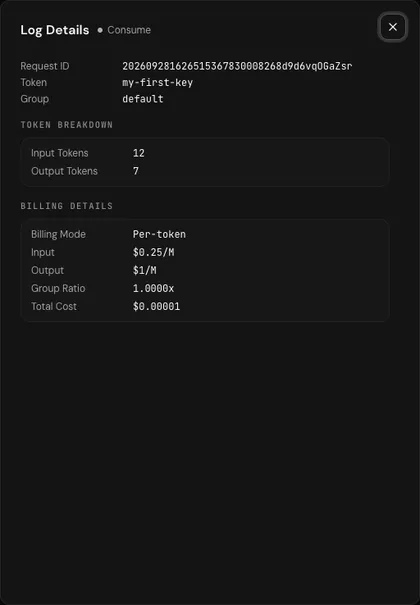
Section titled “A worked example”This is a real log entry from a local test environment. The prices are example prices for testing and are not current NoviaHub prices. The test environment uses the older per-token price settings, so Billing Mode in the screenshot says Per-token; on NoviaHub it says Dynamic Pricing, but per-token prices are calculated the same way:
- Model
deepseek-v4-flash - 12 input tokens, 7 output tokens, no cache
- Input price $0.25 / 1M tokens, output price $1 / 1M tokens, group ratio 1
Cost = (12 × 0.25 + 7 × 1) ÷ 1,000,000 × 1 = $0.00001, which is the Total Cost shown in the log.
Group ratio
Section titled “Group ratio”A “group” decides which set of routes a call uses and which ratio it is multiplied by. NoviaHub currently has a single group, default (shown as 默认分组), with a ratio of 1, so you pay the listed price. If groups are added later, the price table in the model’s details will list a price for each group.
Pre-charge first, settle afterwards
Section titled “Pre-charge first, settle afterwards”- Before the request: NoviaHub estimates from the input roughly what the call will cost, checks that your balance covers it, and holds that amount from your balance (the pre-charge). If your balance is above $10 and the API key either has Unlimited Quota or more than $10 of quota left, the pre-charge is skipped and the actual cost is charged when the request finishes.
- After the request: the real cost is calculated from the usage the model reports. Any excess is returned and any shortfall is charged.
- If the request fails: when the whole request fails (for example the upstream returns an error), the pre-charge is returned in full and nothing is charged.
When the balance is too low, the request is refused straight away with HTTP 403 and the error code insufficient_user_quota:
- balance already 0 or negative: the message is
用户额度不足, 剩余额度: …(“insufficient user quota, remaining: …”); - balance above 0 but less than this request’s pre-charge estimate: the message is
预扣费额度失败, 用户剩余额度: …, 需要预扣费额度: …(“pre-charge failed, remaining: …, required: …”).
These two messages exist only in Chinese. So when your balance is low, a request can be refused even though some balance seems to be left. Topping up fixes it.
API key quotas and your account balance
Section titled “API key quotas and your account balance”- Charges come out of your account balance, never out of an individual API key.
- The Quota you set on an API key is only a spending cap: once the key has spent up to the cap, its status becomes Exhausted and it stops working. What it spent still came out of your account balance.
- A key with Unlimited Quota has no cap, but it also stops working when your balance runs out.
See API keys.
How to check charges
Section titled “How to check charges”- Open Usage logs in the console. Each row is one call, and the Cost column is what it cost.
- Click Details. Billing Details shows the billing mode, the matched tier, each price, the group ratio and the total cost; Token Breakdown shows how many input, output and cache tokens were used.
- At the top of Wallet, Total Usage is your total spending and Current Balance is what is left.
How to add balance
Section titled “How to add balance”On the Wallet page you can top up online (Stripe, Alipay, WeChat Pay or Heleket cryptocurrency) or redeem a code; see Wallet and top-ups.